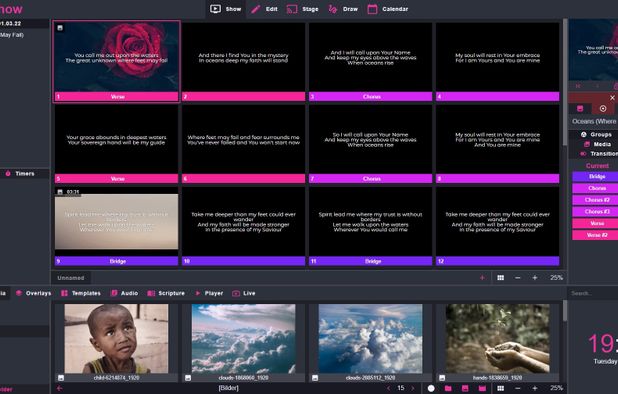
FreeShow 1.5.6

FreeShow Full Download Summary

FreeShowOffice Suites & ToolsWindows 11, Windows 10 32/64 bit

User Rating: 3.0 (2 votes)

  • File size: 121.00 MB
  • Platform: Windows 11, Windows 10 32/64 bit
  • License: Open Source
  • Price: FREE
  • Downloads: Total: 262 | This Month: 32
  • Released: Jan 21, 2026
  • Publisher: Kristoffer Vassbø
  • Publisher URL: https://freeshow.app/

FreeShow 1.5.6 Full Description

FreeShow, developed by Kristoffer Vassbø, is a versatile and user-friendly presentation software designed to cater to a wide range of users, from educators and business professionals to event organizers and hobbyists. This innovative tool stands out in the crowded field of presentation software by offering a unique blend of simplicity, flexibility, and powerful features, all wrapped in an intuitive interface.

At its core, FreeShow is built to make the creation and delivery of presentations as seamless as possible. The software supports a variety of media types, including images, videos, and text, allowing users to craft engaging and dynamic presentations that capture their audience's attention. One of the standout features of FreeShow is its drag-and-drop functionality, which simplifies the process of adding and arranging content on slides. This feature is particularly beneficial for users who may not be tech-savvy, as it reduces the learning curve and enables them to produce professional-quality presentations with minimal effort.

FreeShow also excels in its customization options. Users can choose from a wide array of templates and themes to match the tone and style of their presentation. Additionally, the software offers advanced editing tools, such as image cropping, text formatting, and video trimming, providing users with the flexibility to fine-tune their content to perfection. For those who require more control over their presentations, FreeShow includes options for adding animations and transitions, which can be customized to create a more polished and engaging experience.

Another noteworthy aspect of FreeShow is its collaboration capabilities. The software supports real-time collaboration, allowing multiple users to work on a presentation simultaneously. This feature is particularly useful for teams working remotely or in different locations, as it facilitates seamless communication and ensures that everyone is on the same page. Furthermore, FreeShow's cloud-based storage ensures that presentations are always accessible and up-to-date, regardless of where users are accessing them from.

In terms of performance, FreeShow is designed to be lightweight and efficient, ensuring that it runs smoothly on a variety of devices, from desktops to tablets. The software's responsive design ensures that presentations look great on any screen size, making it an ideal choice for users who need to present on the go. Additionally, FreeShow's offline mode allows users to work on their presentations without an internet connection, providing added convenience and flexibility.

Security is another area where FreeShow shines. The software employs robust encryption and security protocols to protect users' data and ensure that their presentations remain confidential. This is particularly important for business users who may be handling sensitive information.

In summary, FreeShow by Kristoffer Vassbø is a powerful and versatile presentation software that combines ease of use with a rich set of features. Its intuitive interface, extensive customization options, and robust collaboration tools make it an excellent choice for a wide range of users. Whether you're an educator looking to create engaging lessons, a business professional preparing for a critical meeting, or an event organizer planning a large-scale presentation, FreeShow provides the tools you need to succeed.

FreeShow 1.5.6 Bookmark

Hyperlink code:
Hyperlink and Intro code:
Hyperlink for Forum code:

FreeShow 1.5.6 Free Download Notice

Top 4 Download periodically updates software information of FreeShow 1.5.6 full version from the publisher, but some information may be slightly out-of-date.

Using warez version, crack, warez passwords, patches, serial numbers, registration codes, key generator, pirate key, keymaker or keygen for FreeShow 1.5.6 license key is illegal and prevent future development of FreeShow 1.5.6. Download links are directly from our mirrors or publisher's website, FreeShow 1.5.6 torrent files or shared files from free file sharing and free upload services, including Rapidshare, HellShare, HotFile, FileServe, MegaUpload, YouSendIt, SendSpace, DepositFiles, Letitbit, MailBigFile, DropSend, MediaMax, LeapFile, zUpload, MyOtherDrive, DivShare or MediaFire, are not allowed!

Your computer will be at risk getting infected with spyware, adware, viruses, worms, trojan horses, dialers, etc while you are searching and browsing these illegal sites which distribute a so called keygen, key generator, pirate key, serial number, warez full version or crack for FreeShow 1.5.6 download. These infections might corrupt your computer installation or breach your privacy. A keygen or key generator might contain a trojan horse opening a backdoor on your computer. Hackers can use this backdoor to take control of your computer, copy data from your computer or to use your computer to distribute viruses and spam to other people.

FreeShow 1.5.6 - Post Your Review

Slide Executive Desktop 2.9.4

Slide Executive Desktop converts your Microsoft® PowerPoint® presentation files into a searchable knowledgebase of digital assets. ... library and a tool to easily create new presentations. * Exceptional value Slide Executive Desktop helps you get an outstanding return ... with a tool to organize and search your presentation. In less than an hour of saved time ...
software pick

Project Colletta 3.0.0.0

Project Colletta will install on 32-bit or 64-bit Windows ... is little that brings the different applications together. Project Colletta spans multiple document types (including email items ... exposes the tags outside of the applications. Project Colletta consists of two main components that enable ... application window (note that the DeskBar component of Project Colletta has to be running for the DocBar ...
software pick

Project Training 4.0.1.5

Enterprise-wide online scheduling software delivers appropriate details of training and touring activities within shorten time frame and budgets. Economical tour and training software provides cost effective way from small size to large size organization entire details of multiple company employee training details in few mouse clicks. Best staff scheduling application efficiently ...

Project Plan Excel ZIP 1.0

... of EVENTS and MONETARY documents linked to 4 PROJECTS. This file can manage projects lasting less than 3 YEARS / 36 MONTHS ... currency, and other 5 options. DURATION OF THE PROJECT: You set the overall duration of the projects through a "Period's TYPE" (year/month/week/day) "Quantity" and "START ... enter document data with values related to the project, and their temporal competence. Each project is shown ...

Seavus Project Viewer 19.0

Seavus Project Viewer is a complete viewer for Microsoft® Project files that facilitates excellent cooperation in projects where the project stakeholders need to view and share information from project management. It is a low cost solution for project members who only need to view MS® Project files and update their tasks. The first ...
software pick