TCPView 4.19

TCPView Full Download Summary

TCPViewNetwork MonitoringWindows 8, Windows 8 x64, Windows 10, Windows 10 x64, Windows 11

User Rating: 1.5 (11 votes)

top download editor's pick
  • File size: 2.10 MB
  • Platform: Windows 8, Windows 8 x64, Windows 10, Windows 10 x64, Windows 11
  • License: Freeware
  • Price: FREE
  • Downloads: Total: 785 | This Month: 0
  • Released: Apr 11, 2023
  • Publisher: Microsoft
  • Publisher URL: https://www.microsoft.com

TCPView 4.19 Full Description

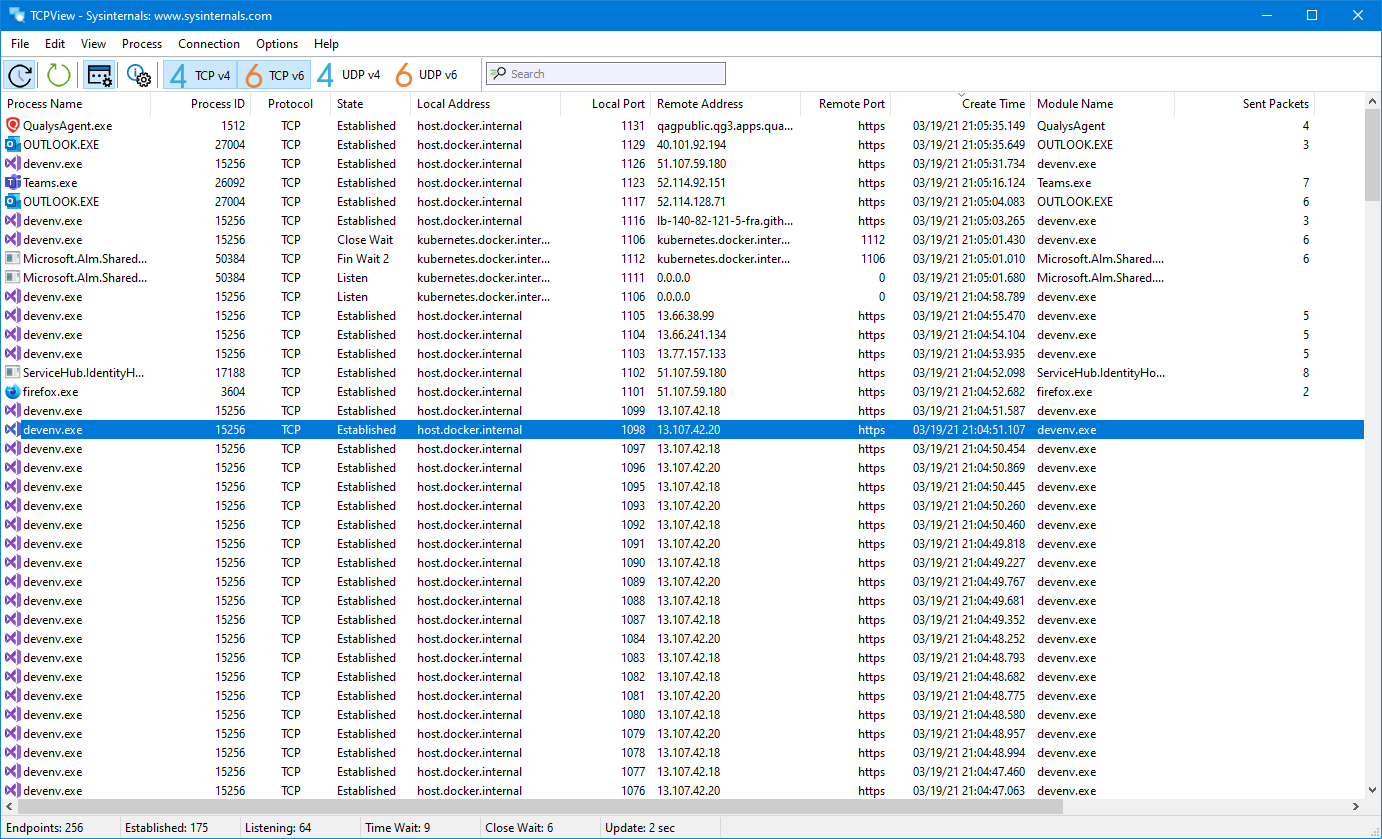
TCPView is a Windows program that will show you detailed listings of all TCP and UDP endpoints on your system, including the local and remote addresses and state of TCP connections.

On Windows Server 2008, Vista, and XP, TCPView also reports the name of the process that owns the endpoint. TCPView provides a more informative and conveniently presented subset of the Netstat program that ships with Windows. The TCPView download includes Tcpvcon, a command-line version with the same functionality.

Using TCPView

When you start TCPView it will enumerate all active TCP and UDP endpoints, resolving all IP addresses to their domain name versions. You can use a toolbar button or menu item to toggle the display of resolved names. On Windows XP systems, TCPView shows the name of the process that owns each endpoint.

By default, TCPView updates every second, but you can use the Options|Refresh Rate menu item to change the rate. Endpoints that change state from one update to the next are highlighted in yellow; those that are deleted are shown in red, and new endpoints are shown in green.

You can close established TCP/IP connections (those labeled with a state of ESTABLISHED) by selecting File|Close Connections, or by right-clicking on a connection and choosing Close Connections from the resulting context menu.

You can save TCPView's output window to a file using the Save menu item.

Using Tcpvcon

Tcpvcon usage is similar to that of the built-in Windows netstat utility:

Usage: tcpvcon [-a] [-c] [-n] [process name or PID]
-a Show all endpoints (default is to show established TCP connections).
-c Print output as CSV.
-n Don't resolve addresses..

TCPView 4.19 Bookmark

Hyperlink code:
Hyperlink and Intro code:
Hyperlink for Forum code:

TCPView 4.19 Free Download Notice

Top 4 Download periodically updates software information of TCPView 4.19 full version from the publisher, but some information may be slightly out-of-date.

Using warez version, crack, warez passwords, patches, serial numbers, registration codes, key generator, pirate key, keymaker or keygen for TCPView 4.19 license key is illegal and prevent future development of TCPView 4.19. Download links are directly from our mirrors or publisher's website, TCPView 4.19 torrent files or shared files from free file sharing and free upload services, including Rapidshare, HellShare, HotFile, FileServe, MegaUpload, YouSendIt, SendSpace, DepositFiles, Letitbit, MailBigFile, DropSend, MediaMax, LeapFile, zUpload, MyOtherDrive, DivShare or MediaFire, are not allowed!

Your computer will be at risk getting infected with spyware, adware, viruses, worms, trojan horses, dialers, etc while you are searching and browsing these illegal sites which distribute a so called keygen, key generator, pirate key, serial number, warez full version or crack for TCPView 4.19 download. These infections might corrupt your computer installation or breach your privacy. A keygen or key generator might contain a trojan horse opening a backdoor on your computer. Hackers can use this backdoor to take control of your computer, copy data from your computer or to use your computer to distribute viruses and spam to other people.

TCPView 4.19 - Post Your Review

CurrPorts 2.77

CurrPorts displays the list of all currently opened TCP/IP and UDP ports on your local computer. For each port ... In addition, CurrPorts allows you to close unwanted TCP connections, kill the process that opened the ports, and save the TCP/UDP ports information to HTML file , XML file, ... CurrPorts also automatically mark with pink color suspicious TCP/UDP ports owned by unidentified applications (Applications without version ...

ProcessTCPSummary 1.22

... to provide users with a comprehensive summary of TCP connections initiated by processes running on their Windows system. ... interface that displays a detailed list of active TCP connections. Each entry in the list includes essential information ... its ability to display the total number of TCP connections for each process, along with the total data ...

Advanced Connection Viewer 1.7

... simplifies the task of monitoring active connections (HTTP, TCP / IP, UDP, etc.) on your Microsoft Windows laptop, desktop or ... the following information about each connection: protocol, both endpoints and state. The application allows users to perform an immediate 'whois' operation by double-clicking an endpoint IP address and enables logging of connection details ...

SmartSniff 2.30

SmartSniff allows you to capture TCP/IP packets that pass through your network adapter, and ... between clients and servers. You can view the TCP/IP conversations in Ascii mode (for text-based protocols, like ... like DNS) SmartSniff provides 2 methods for capturing TCP/IP packets : * Raw Sockets (Only for Windows 2000/XP or greater): Allows you to capture TCP/IP packets on your network without installing a capture ...

sMonitor 4.3.5.049

... of both local and remote servers over the TCP/IP protocol. The software creates a customizable HTML file ... as both visual and audible alerts. sMonitor supports TCP, UDP and ICMP and it can send protocol-specific UDP requests to DHCP, TFTP, NTP, NETBOIS, SNMP and ...
software award