jedit 5.7.0 Full Description
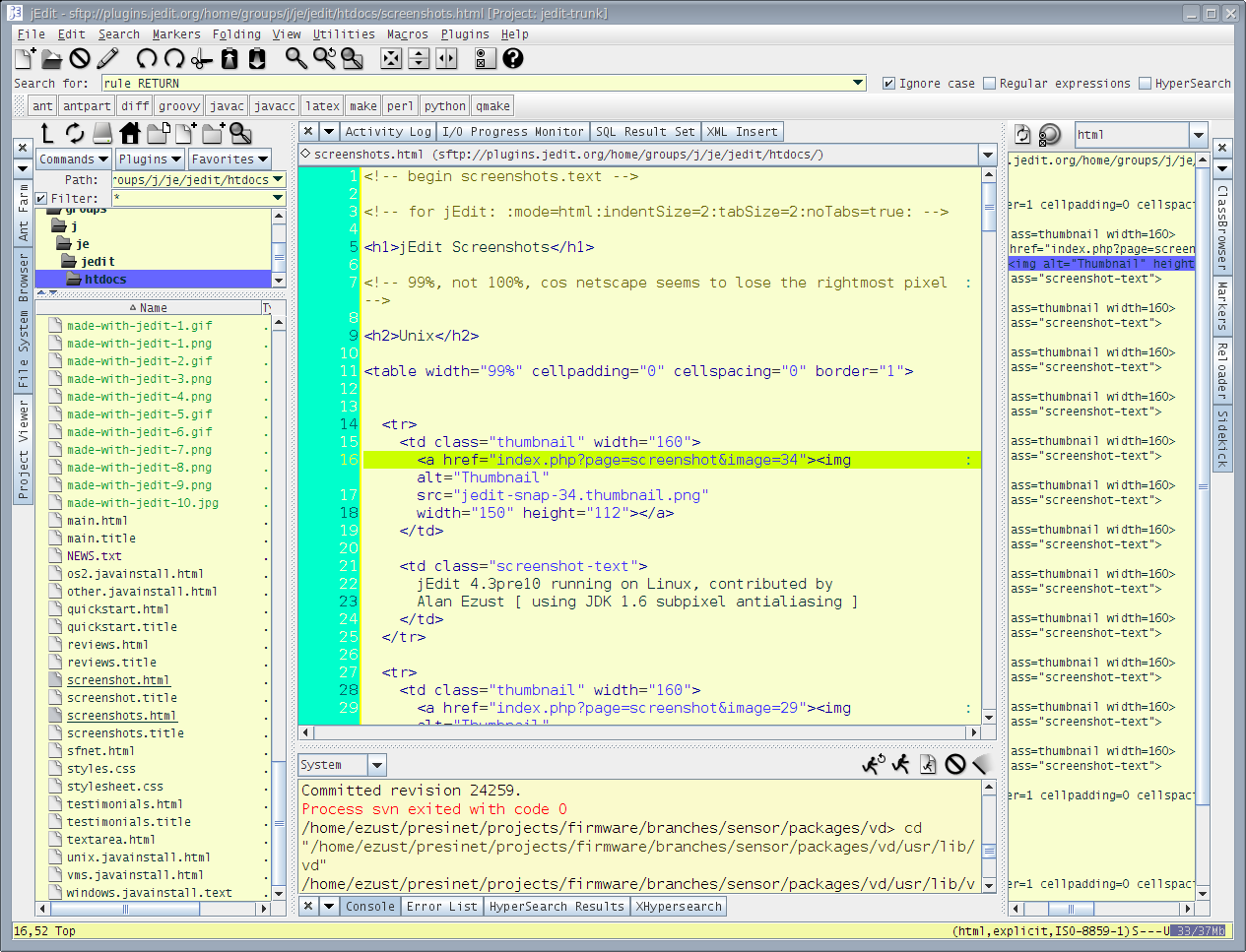
jEdit, developed by The jEdit Team, is a powerful, open-source text editor that caters to the needs of programmers and developers. This versatile tool is built in Java, making it cross-platform and capable of running on any operating system that supports Java, including Windows, macOS, and Linux.
One of jEdit's standout features is its extensive plugin architecture. With a rich ecosystem of plugins, users can customize and extend the functionality of the editor to suit their specific requirements. Whether you need syntax highlighting for a niche programming language, version control integration, or advanced editing capabilities, jEdit's plugin manager makes it easy to find and install the tools you need.
The editor supports syntax highlighting for over 200 programming languages out of the box, making it an excellent choice for polyglot developers. Additionally, jEdit's folding feature allows users to collapse and expand code sections, which is particularly useful for navigating large files and improving code readability.
jEdit also boasts a highly customizable interface. Users can tailor the look and feel of the editor through various themes and font options, ensuring a comfortable and personalized coding environment. The editor's multi-buffer feature allows for seamless switching between multiple open files, enhancing productivity and workflow efficiency.
Another notable feature is jEdit's robust search and replace functionality. With support for regular expressions and multi-file search, users can quickly locate and modify code across entire projects. The editor also includes a powerful macro system, enabling users to automate repetitive tasks and streamline their development process.
Despite its rich feature set, jEdit remains lightweight and efficient, ensuring smooth performance even when handling large files or complex projects. The editor's active user community and comprehensive documentation provide ample support for both new and experienced users, making it easy to get started and master the tool.
In summary, jEdit is a highly adaptable and feature-rich text editor that excels in providing a customizable and efficient coding environment. Its extensive plugin support, robust search capabilities, and user-friendly interface make it a valuable tool for developers of all levels. Whether you're working on a small script or a large-scale project, jEdit offers the flexibility and power you need to enhance your productivity.
Release notes:
New Release
Bug Fixes:
Support arm64 Java installations in the macOS launcher (#4123 - Björn Kautler)
Do not forward the --verbose parameter in the macOS launcher to jEdit during investigating startup problems (Björn Kautler)
Show Temurin download link in macOS launcher if no compatible Java version was found instead of java.com and oracle.com where Java 8 is promoted (Björn Kautler)
Support Java installations with paths that are not following the old naming conventions regarding their version in the macOS launcher (Björn Kautler)
Bundle the new MacOS 1.5 plugin instead of the old MacOSX 1.3 plugin to become compatible with newer Java versions (Björn Kautler)
Fix NullPointerException during saving autosave settings if no previous autosave directory was set (Björn Kautler)
BeanShell snippets and macros now work consistently and not suddenly change behaviour anymore just because some BeanShell snippet defined a class.This now disables reflective access to otherwise inaccessible fields through simple syntax though, that used to work after a snippet with a class definition was loaded. (#4118 - Björn Kautler)
Fix the installation of plugins trying to use invalid file names (Björn Kautler)
VFSManager.canReadFile() was returning true only for directories (#4102 - Matthieu Casanova)
Allow user to choose filename when printing to pdf (partial fix for #4115 - Dale Anson)
Key handling in the Errors dialog uses current keymap (#4128 - Eric Le Lay)
Delete at the end of the line does not delete newline on java20, java21 (#4125 - Eric Le Lay)
Freeze when deleting a directory and some children (race condition) (#4132 - Eric Le Lay)
Miscellaneous:
Improve logging of startup errors in the macOS launcher with --verbose option (Björn Kautler)
Update launch4j to version 3.50 and also search in PATH environment variable for a Java runtime from the EXE launcher (Björn Kautler)
Update macOS app bundler to version 1.3.0 (Björn Kautler)
Status bar design updated with
[
jedit full changelog ]
jedit 5.7.0 Free Download Notice
Top 4 Download periodically updates software information of jedit 5.7.0 full version from the publisher,
but some information may be slightly out-of-date.
Using warez version, crack, warez passwords, patches, serial numbers, registration codes, key generator, pirate key, keymaker or keygen for
jedit 5.7.0 license key is illegal and prevent future development of
jedit 5.7.0. Download links are directly from our mirrors or publisher's website,
jedit 5.7.0 torrent files or shared files from free file sharing and free upload services,
including Rapidshare, HellShare, HotFile, FileServe, MegaUpload, YouSendIt, SendSpace, DepositFiles, Letitbit, MailBigFile, DropSend, MediaMax, LeapFile, zUpload, MyOtherDrive, DivShare or
MediaFire,
are not allowed!
Your computer will be at risk getting infected with spyware, adware, viruses, worms, trojan horses, dialers, etc
while you are searching and browsing these illegal sites which distribute a so called keygen, key generator, pirate key, serial number, warez full version or crack for
jedit 5.7.0 download. These infections might corrupt your computer installation or breach your privacy.
A keygen or key generator might contain a trojan horse opening a backdoor on your computer.
Hackers can use this backdoor to take control of your computer, copy data from your computer or to use your computer to distribute viruses and spam to other people.


 Free Download
 Save to my software