FileBox eXtender (x32 bit) 2.01.00

FileBox eXtender (x32 bit) 2.01.00

FileBox eXtender (x32 bit) Full Download Summary

FileBox eXtender (x32 bit)Launchers & Task ManagersWindows 2000, Windows 2003, Windows XP, Windows Vista, Windows 7, Windows 8, Windows 10

User Rating: 2.4 (11 votes)

top download editor's pick
  • File size: 1.60 MB
  • Platform: Windows 2000, Windows 2003, Windows XP, Windows Vista, Windows 7, Windows 8, Windows 10
  • License: Open Source
  • Price: FREE
  • Downloads: Total: 428 | This Month: 9
  • Released: Feb 23, 2011
  • Publisher: Hyperionics Technology LLC
  • Publisher URL: http://www.hyperionics.com/

FileBox eXtender (x32 bit) 2.01.00 Full Description

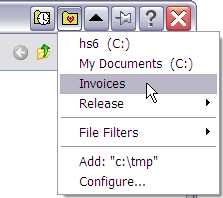
FileBox eXtender enhances the Windows user interface in several powerful ways. It adds a "push-pin" button to your "top level" windows. This function prevents any window you "pin" to the desktop from being covered by any other windows.

This is great when you want to keep an eye on one program, but use another. (For example, refer to a document window in Word while typing an E-mail in another program.)

FileBox eXtender is a tool that helps you to manage windows and navigate folders.

Another FileBox enhancement is the "roll-up" button added to top level windows. When you click it, the window is "rolled up" leaving only its title bar visible, and uncovering what was underneath it. Click that button again, and the window rolls back down.

FileBox eXtender Features:

· FileBox enhances Windows by adding several advanced functions to the standard Open File and Save File dialog boxes. (Note that if a program uses its own "private" dialog boxes for these functions, you won't see our FileBox buttons, sorry.)
· FileBox adds two handy buttons to these standard dialogs. These appear on the right side of the Windows dialog box title bars. These buttons appear next to the minimize, restore, and maximize buttons with which you're probably already familiar.
· FileBox can also forcibly resize the standard Windows file management dialog boxes so they're bigger, and thus easier to use if you've got lots of files in a folder through which you need to look.

Release notes:

New Release
Claudio Nicora, http://coolsoft.altervista.org, fixed the following for Windows 7:

* in Windows Explorer, selecting a preferred folder from FBX dropdown menu causes another instance of Explorer to start (correctly showing the selected folder)
* "Click-switch file box folder" feature does not work
[ FileBox eXtender (x32 bit) full changelog ]

FileBox eXtender (x32 bit) 2.01.00 Bookmark

Hyperlink code:
Hyperlink and Intro code:
Hyperlink for Forum code:

FileBox eXtender (x32 bit) 2.01.00 Free Download Notice

Top 4 Download periodically updates software information of FileBox eXtender (x32 bit) 2.01.00 full version from the publisher, but some information may be slightly out-of-date.

Using warez version, crack, warez passwords, patches, serial numbers, registration codes, key generator, pirate key, keymaker or keygen for FileBox eXtender (x32 bit) 2.01.00 license key is illegal and prevent future development of FileBox eXtender (x32 bit) 2.01.00. Download links are directly from our mirrors or publisher's website, FileBox eXtender (x32 bit) 2.01.00 torrent files or shared files from free file sharing and free upload services, including Rapidshare, HellShare, HotFile, FileServe, MegaUpload, YouSendIt, SendSpace, DepositFiles, Letitbit, MailBigFile, DropSend, MediaMax, LeapFile, zUpload, MyOtherDrive, DivShare or MediaFire, are not allowed!

Your computer will be at risk getting infected with spyware, adware, viruses, worms, trojan horses, dialers, etc while you are searching and browsing these illegal sites which distribute a so called keygen, key generator, pirate key, serial number, warez full version or crack for FileBox eXtender (x32 bit) 2.01.00 download. These infections might corrupt your computer installation or breach your privacy. A keygen or key generator might contain a trojan horse opening a backdoor on your computer. Hackers can use this backdoor to take control of your computer, copy data from your computer or to use your computer to distribute viruses and spam to other people.

FileBox eXtender (x32 bit) 2.01.00 - Post Your Review

Mz StartUp Manager 3.1.0

Mz StartUp Manager was designed to help users easily control Windows startup configuration. You can add, enable-disable or delete unwanted programs which automatically start after boot, making the startup procedure more efficient and faster. ...
software pick

Red Button 6.7
Update

**Red Button by Pothos: A Comprehensive Software Review** Red Button, developed by Pothos, is a versatile utility software ... efficiency. **User Interface and Experience** Red Button boasts a clean, intuitive interface that caters to ... **Core Features** 1. **System Optimization**: Red Button excels in optimizing Windows systems by removing redundant ...

Simple Startup Manager 1.17

... launch a number of additional programs. Simple Startup Manager allows you to manage which programs to run at Windows startup. This software gives you the ability to add, delete and edit applications to be run at system ...

Key Manager 1.13

Key Manager reveals the full potential of your keyboard and ... actions and execute them by pressing keys, mouse buttons and combinations of both, as well as represent ... this, the application features powerful key and mouse button redefinition and blocking tools. Key redefinition and the ... be restricted to specific applications and/or windows. Key Manager allows you to assign the following actions to ...

AgataSoft HotKey Manager 1.4

... often! It's easy - just use AgataSoft HotKey Manager. AgataSoft HotKey Manager is a hotkey manager for Windows. With this program, you can easily ... can also do the following with AgataSoft HotKey Manager: Assign a hotkey to the "Open My Computer" ... other actions. Some key features of AgataSoft HotKey Manager: Easily assign keyboard shortcuts to your programs. Assign ...