WebCamGhost 1.4.081

WebCamGhost 1.4.081

WebCamGhost Full Download Summary

WebCamGhostWeb/Video CamsWindows XP, Windows Vista, Windows Vista x64, Windows 7, Windows 7 x64, Windows 8, Windows 8 x64

User Rating: 3.7 (10 votes)

  • File size: 911 kB
  • Platform: Windows XP, Windows Vista, Windows Vista x64, Windows 7, Windows 7 x64, Windows 8, Windows 8 x64
  • License: Free To Try
  • Price: $29.95
  • Downloads: Total: 247 | This Month: 5
  • Released: Nov 20, 2012
  • Publisher: VerySoft LLC.
  • Publisher URL: http://very-soft.com/company/contact

WebCamGhost 1.4.081 Full Description

WebCamGhost is a business to business (B2B) level application designed for hardware and/or software vendors, video streaming site owners and other Customers who need to integrate sharing video source functionality into their products, solutions, bundles and environments.

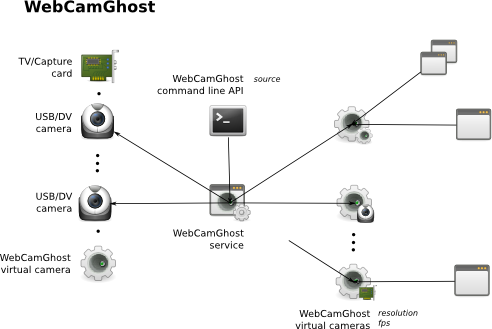
It is known that in Windows™ environment, end user can not use stream from web camera more than in one application. If Customer product requires an ability to capture video source more than once (share video source between 2 or more applications), WebCamGhost is the best choice.

WebCamGhost Features:

works as Windows service, invisible for End User. It is ideal solution for integration into 3rd party applications that require video source splitting function;
multiple source devices splitted simultaneously;
wide set of source devices supported: web cameras, TV-tuners, capture cards, DV-cameras;
“on the fly” self-tuning for client application requirements (resolution, quality, fps etc);
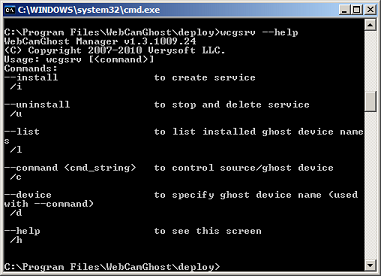
powerful command-line interface;
provided with .cmd install scripts, which can be customized and used for simple integration into your deployment environment/cycle;
OEM registration key on multiple installations is provided;
detailed User Guide;
priority support.
WebCamGhost is compatible with all applications that properly support capture of standard Windows video devices.

Release notes:

New Release
· Added 3 virtual cameras "Epsilon", "Zeta", "Eta"
· Service main executable file got digital signature
· "Delta" device install script bug fixed
· command to specify device analog video decoder TV format
· Installation ID registration scheme support
· Very long registration information
· DV camera Audio doesn't work in Vista, 7
· command to specify which source video input to be used (if any)
· service crash when camera is used by other application
· source selection bugfix
· drvman is required Administarator level
· new extend image transformation mode
· multiple ghost device installation and usage bugfix
· x64 support
[ WebCamGhost full changelog ]

WebCamGhost 1.4.081 Bookmark

Hyperlink code:
Hyperlink and Intro code:
Hyperlink for Forum code:

WebCamGhost 1.4.081 Free Download Notice

Top 4 Download periodically updates software information of WebCamGhost 1.4.081 full version from the publisher, but some information may be slightly out-of-date.

Using warez version, crack, warez passwords, patches, serial numbers, registration codes, key generator, pirate key, keymaker or keygen for WebCamGhost 1.4.081 license key is illegal and prevent future development of WebCamGhost 1.4.081. Download links are directly from our mirrors or publisher's website, WebCamGhost 1.4.081 torrent files or shared files from free file sharing and free upload services, including Rapidshare, HellShare, HotFile, FileServe, MegaUpload, YouSendIt, SendSpace, DepositFiles, Letitbit, MailBigFile, DropSend, MediaMax, LeapFile, zUpload, MyOtherDrive, DivShare or MediaFire, are not allowed!

Your computer will be at risk getting infected with spyware, adware, viruses, worms, trojan horses, dialers, etc while you are searching and browsing these illegal sites which distribute a so called keygen, key generator, pirate key, serial number, warez full version or crack for WebCamGhost 1.4.081 download. These infections might corrupt your computer installation or breach your privacy. A keygen or key generator might contain a trojan horse opening a backdoor on your computer. Hackers can use this backdoor to take control of your computer, copy data from your computer or to use your computer to distribute viruses and spam to other people.

WebCamGhost 1.4.081 - Post Your Review

WebCam-Control-Center 7.2.1

Add live Webcam images to your website quickly and easily. WebCam-Control-Center comprehensive motion detection system and auto-capture makes it easy to monitor any area with your Webcam. Schedule its FTP/Email client to take and upload ... controlling frame rates. Additionally, take pictures with your Webcam and date stamp or put captions on the ...
software award

WebCam Laboratory 1.41

... nature and your immediate surroundings. If you have WebCam Laboratory, all you need is an intelligent and ... – that is you – and a simple webcam. WebCam Laboratory allows you to observe things and phenomena ... as it is, but with the help of WebCam Laboratory, all this is just a click away. ...
software pick

Webcam Capture Studio 4.0

Webcam Capture Studio is a easy-to-use and powerful software. By supporting effectively encoding and face detection, Webcam Capture Studio can record videos with extremely small ... software with a friendly UI, it's a perfect webcam recorder, Desktop video capture and screen capture application, it saves pictures from webcam into the popular formats Record videos of fantastic ...

Webcam Zone Trigger 3.7

... Versatile Motion Detection Solution by Omega Unfold** Webcam Zone Trigger, developed by Omega Unfold, is a sophisticated motion detection software that transforms your webcam into a powerful surveillance tool. Designed for both ... Setup** One of the standout features of Webcam Zone Trigger is its intuitive interface, which allows ... users through each step to ensure that their webcam is configured correctly for optimal performance. The clean ...

Webcam Software 6.95c

Webcam Software is one of the fastest and powerful ... It allows you to record multiple monitor screens, webcams and ip cameras at once. You can record ... with a high compression ratio and excellent quality Webcam software allows you to select your computer screen as a video source for recording and ...