MacOS Labeling & Printing Application 9.3.2.4

MacOS Labeling & Printing Application 9.3.2.4

MacOS Labeling & Printing Application Full Download Summary

MacOS Labeling & Printing ApplicationInventory & BarcodingMacOS 12, MacOS 11, MacOS 10.12, MacOS 10.13, MacOS 10.14, MacOS 10.15, Mac OS X, other Apple Mac OS

User Rating: 0 (0 votes)

  • File size: 6.19 MB
  • Platform: MacOS 12, MacOS 11, MacOS 10.12, MacOS 10.13, MacOS 10.14, MacOS 10.15, Mac OS X, other Apple Mac OS
  • License: Free To Try
  • Price: $69.00
  • Downloads: Total: 89 | This Month: 5
  • Released: Jul 28, 2022
  • Publisher: TradeLabelSoftware.com
  • Publisher URL: https://www.tradelabelsoftware.com

MacOS Labeling & Printing Application 9.3.2.4 Full Description

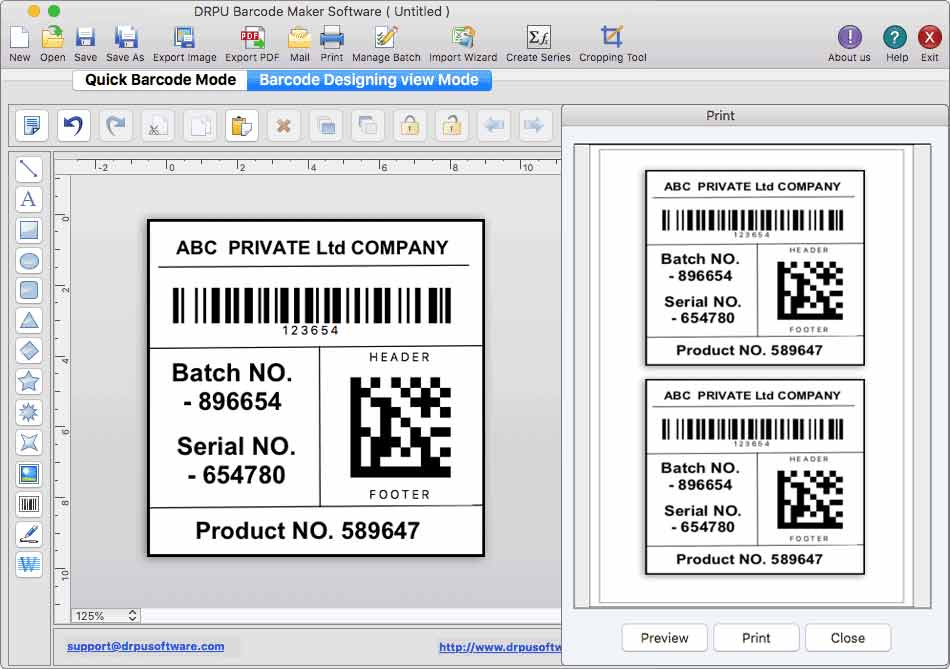
Barcode Label Designing and Printing software creates customized barcode labels as per Mac user’s requirements. Apple Mac users can design batches of labels using Batch processing feature by importing and exporting Excel datasheet. Steps to create barcode labels using Mac OS Label Printing Application: Step 1- Install the Mac Label Maker Software on your Windows. Step 2- Run the software on your Mac Book or desktop. Step 3- Users create barcode labels using the Quick barcode mode or barcode designing view mode. Step 4- Quick Barcode mode User firstly choose the linear or 2-D barcode fonts as per the requirement and also enter the value of the barcode labels, such as the primary value, header and footer data etc. User Change the general parameters, font settings, color settings, and image settings for barcodes as per the requirement. Step 5- Barcode designing view mode Go to the drawing tool, click on barcode, which will generate a barcode image on the card, and then double-click on the generated barcode image to edit its properties. Now user may change the barcode value, barcode header, and barcode footer to fulfill the requirement. To generate a barcode and see a preview, User can change the size, font, color, and other barcode attributes. Step 6- Using batch processing series option of the software you can generate multiple barcode label with the help of MS-Excel so this barcode label support excel data and bulk operation with live feature. The batch processing series also support text file and copy paste of list. Step 7- Sequential, Constant, and Random order formats are all available in the Mac barcode labelling software to create multiple barcodes at a given time period. Step 8- Mac Barcode software has built-in email settings allows user to send created barcode coupons and images to a specific email address. Step 9- Mac software export the barcode labels in image or PDF file formats.

Requirements:

All Apple Mac Operating Systems

Release notes:

Major Update
Added Support for Latest Mac OS X, MacOS and all other Apple Mac Operating System Updates. Added Support for High DPI resolutions Compatibility. Added new Barcode Technologies. Added additional Batch Processing Features to import Data from Excel Sheets.
[ MacOS Labeling & Printing Application full changelog ]

MacOS Labeling & Printing Application 9.3.2.4 Bookmark

Hyperlink code:
Hyperlink and Intro code:
Hyperlink for Forum code:

MacOS Labeling & Printing Application 9.3.2.4 Free Download Notice

Top 4 Download periodically updates software information of MacOS Labeling & Printing Application 9.3.2.4 full version from the publisher, but some information may be slightly out-of-date.

Using warez version, crack, warez passwords, patches, serial numbers, registration codes, key generator, pirate key, keymaker or keygen for MacOS Labeling & Printing Application 9.3.2.4 license key is illegal and prevent future development of MacOS Labeling & Printing Application 9.3.2.4. Download links are directly from our mirrors or publisher's website, MacOS Labeling & Printing Application 9.3.2.4 torrent files or shared files from free file sharing and free upload services, including Rapidshare, HellShare, HotFile, FileServe, MegaUpload, YouSendIt, SendSpace, DepositFiles, Letitbit, MailBigFile, DropSend, MediaMax, LeapFile, zUpload, MyOtherDrive, DivShare or MediaFire, are not allowed!

Your computer will be at risk getting infected with spyware, adware, viruses, worms, trojan horses, dialers, etc while you are searching and browsing these illegal sites which distribute a so called keygen, key generator, pirate key, serial number, warez full version or crack for MacOS Labeling & Printing Application 9.3.2.4 download. These infections might corrupt your computer installation or breach your privacy. A keygen or key generator might contain a trojan horse opening a backdoor on your computer. Hackers can use this backdoor to take control of your computer, copy data from your computer or to use your computer to distribute viruses and spam to other people.

MacOS Labeling & Printing Application 9.3.2.4 - Post Your Review

MacOS Bulk Label Printing Software 9.2.3.3

Barcode sticker creator application for Mac OS X generates printable bulk barcode ... that may be stored in a variety of applications such as Microsoft Excel, Microsoft Paint, and Microsoft ... PNG, WMF, EMF, EXIF and GIF. (V): For printing single or multiple barcode use inbuilt Print setting option and enable print ...

Mac Excel Barcode Designer Application 9.2.3.4

Barcode sticker creator application for Mac OS X generates printable bulk barcode ... that may be stored in a variety of applications such as Microsoft Excel, Microsoft Paint, and Microsoft ... PNG, WMF, EMF, EXIF and GIF. (V): For printing single or multiple barcode use inbuilt Print setting option and enable print ...

Mac OS Bulk Label Designing Software 9.2.3.2

Barcode sticker creator application for Mac OS X generates printable bulk barcode ... that may be stored in a variety of applications such as Microsoft Excel, Microsoft Paint, and Microsoft ... PNG, WMF, EMF, EXIF and GIF. (V): For printing single or multiple barcode use inbuilt Print setting option and enable print ...