HeliosPaint for Mac 1.6 Full Description
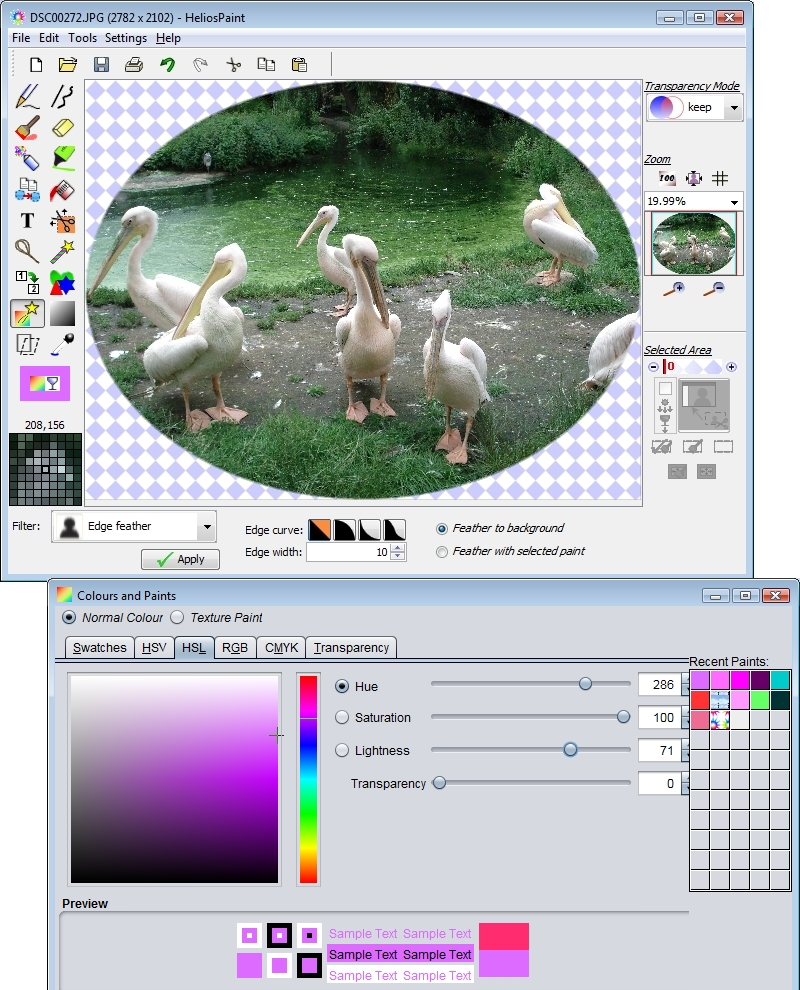
HeliosPaint is a feature-rich, easy-to-use and powerful paint program for editing photos, drawings and icons on Apple Mac OS X computers. It is simple to learn and has a range of standard and advanced tools including: Pencil. Curved, straight and freehand lines with a choice of width, dash pattern and arrow head. Paint Brushes and eraser with adjustable size and edge feathering. Spray Can. Airbrush for copying one area of an image to another for retouching, healing and blending. Paint Can with local and global replace (color bleed sensitivity allows nearby similar colors to be painted). Shapes tool for creating freehand, round, regular polygon, star, moon and heart shapes. Text entry with a choice of font, style, spacing, underline and rotation. Image filters: RGB levels, HSB levels, HSL levels, gamma, transparency, channel mix, temperature and tint, contrast, gain and bias, threshold, black and white, invert, solarize, gray, color filter, sepia tone, sharpen, unsharp mask, blur, block blur, diffuse, dissolve, edge feather, edge detect, oil painting, posterise, emboss, chrome, noise reduce, edge wrap. Batch image resize. Image color and transparency adjustment by flat, round, rectangular and 'fit to shape' gradient patterns (this allows areas of the image to be darkened, brightened and color enhanced). Image flip, scale up, scale down, rotate, shear, perspective view. Full color pallet with adjustable transparency and color grabber. Fully opaque, part transparent or fully transparent background colors. Full texture paint support. High level zoom for easy icon or transparent icon editing. Scissors, lasso and wand for selecting, moving or exporting an area of an image (when part of an image is selected, all paint actions apply only to that area). Transparent PNG and GIF editing. Undo and redo. Printing with auto fit to page. Export image to PDF. Simple and easy to use help file. The help file can be read in a few minutes and explains every process.
Requirements:
Java (Mac OS X comes with this pre-installed but Java 7 is recommended)
HeliosPaint for Mac 1.6 Free Download Notice
Top 4 Download periodically updates software information of HeliosPaint for Mac 1.6 full version from the publisher,
but some information may be slightly out-of-date.
Using warez version, crack, warez passwords, patches, serial numbers, registration codes, key generator, pirate key, keymaker or keygen for
HeliosPaint for Mac 1.6 license key is illegal and prevent future development of
HeliosPaint for Mac 1.6. Download links are directly from our mirrors or publisher's website,
HeliosPaint for Mac 1.6 torrent files or shared files from free file sharing and free upload services,
including Rapidshare, HellShare, HotFile, FileServe, MegaUpload, YouSendIt, SendSpace, DepositFiles, Letitbit, MailBigFile, DropSend, MediaMax, LeapFile, zUpload, MyOtherDrive, DivShare or
MediaFire,
are not allowed!
Your computer will be at risk getting infected with spyware, adware, viruses, worms, trojan horses, dialers, etc
while you are searching and browsing these illegal sites which distribute a so called keygen, key generator, pirate key, serial number, warez full version or crack for
HeliosPaint for Mac 1.6 download. These infections might corrupt your computer installation or breach your privacy.
A keygen or key generator might contain a trojan horse opening a backdoor on your computer.
Hackers can use this backdoor to take control of your computer, copy data from your computer or to use your computer to distribute viruses and spam to other people.





 Free Download
 Save to my software


