GiMeSpace QuickMenu 2.1.0.33

GiMeSpace QuickMenu 2.1.0.33

GiMeSpace QuickMenu Full Download Summary

GiMeSpace QuickMenuLaunchers & Task ManagersWin2000, Windows XP, Windows 7 x32, Windows 7 x64, Windows 8, Windows 10, WinServer, WinOther, Windows Vista, Windows Vista x64

User Rating: 3.3 (3 votes)

  • File size: 875 kB
  • Platform: Win2000, Windows XP, Windows 7 x32, Windows 7 x64, Windows 8, Windows 10, WinServer, WinOther, Windows Vista, Windows Vista x64
  • License: Freeware
  • Price: FREE
  • Downloads: Total: 370 | This Month: 3
  • Released: Sep 9, 2022
  • Publisher: GiMeSpace
  • Publisher URL: https://www.gimespace.com

GiMeSpace QuickMenu 2.1.0.33 Full Description

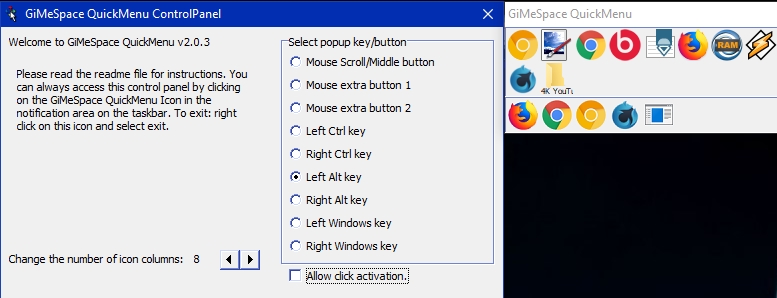
While ms is annoying windows desktop users with metro/modernUI, and other companies are restoring things back to the old, GiMeSpace is offering desktop users something much better: the most simple and fastest task launcher&switcher possible! GiMeSpace QuickMenu! Press a custom assigned mouse/keyboard key, the menu pops up at the place of the mouse cursor, move to the desired task, release the key, and that is all! Can not be quicker or easier! In the control panel you can select the 'hotkey' that you like to use to make the QuickMenu show up. If you rather like one click to make the menu show up and then an other click to select the desired task then you can select 'allow click activation'. You can also adjust the number of icon columns that the menu will show. The QuickMenu has two parts, the upper part shows the running tasks with the tasks you used last, first (like with alt-tab). In the bottom part you can add any item you want (programs, files, shortcuts, etc). While the QuickMenu control panel is shown, you can drag items to the lower part of the QuickMenu and order them in your desired order. You can remove items by right clicking on them. When you add all your favourite programs, you will notice you will hardly ever use the normal startmenu again. When you are done with the Control panel, click the close button and you are ready for a more easy and efficient desktop experience: Simply press your chosen hotkey, the menu shows at the mouse cursor position, move the cursor to the task of your choice and release, the task will show or launch! When the mouse cursor is not too close to the screen border the QuickMenu will show in the position so that the task you used last (before the current one) will show right under the cursor. This way, switching between 2 tasks becomes very easy, you just press the hotkey and release it again, and that is all that is needed to switch to the last task!

Requirements:

none

Release notes:

Major Update
Supports now unicode systems
[ GiMeSpace QuickMenu full changelog ]

GiMeSpace QuickMenu 2.1.0.33 Keywords

GiMeSpace QuickMenu 2.1.0.33 Bookmark

Hyperlink code:
Hyperlink and Intro code:
Hyperlink for Forum code:

GiMeSpace QuickMenu 2.1.0.33 Free Download Notice

Top 4 Download periodically updates software information of GiMeSpace QuickMenu 2.1.0.33 full version from the publisher, but some information may be slightly out-of-date.

Using warez version, crack, warez passwords, patches, serial numbers, registration codes, key generator, pirate key, keymaker or keygen for GiMeSpace QuickMenu 2.1.0.33 license key is illegal and prevent future development of GiMeSpace QuickMenu 2.1.0.33. Download links are directly from our mirrors or publisher's website, GiMeSpace QuickMenu 2.1.0.33 torrent files or shared files from free file sharing and free upload services, including Rapidshare, HellShare, HotFile, FileServe, MegaUpload, YouSendIt, SendSpace, DepositFiles, Letitbit, MailBigFile, DropSend, MediaMax, LeapFile, zUpload, MyOtherDrive, DivShare or MediaFire, are not allowed!

Your computer will be at risk getting infected with spyware, adware, viruses, worms, trojan horses, dialers, etc while you are searching and browsing these illegal sites which distribute a so called keygen, key generator, pirate key, serial number, warez full version or crack for GiMeSpace QuickMenu 2.1.0.33 download. These infections might corrupt your computer installation or breach your privacy. A keygen or key generator might contain a trojan horse opening a backdoor on your computer. Hackers can use this backdoor to take control of your computer, copy data from your computer or to use your computer to distribute viruses and spam to other people.
GiMeSpace QuickMenu 2.1.0.33 - Post Your Review

Task Till Dawn 2.21

Task Till Dawn is a free task scheduler which can execute your repetitive tasks (i.e. open files or applications) at specified times or intervals. For example, use Task Till Dawn to automatically let iTunes download the ... your important files every day. Needless to say, tasks can also be executed manually. The application ...
software pick

Task Till Dawn for Mac OS X 2.21

Task Till Dawn is a free task scheduler which can execute your repetitive tasks (i.e. open files or applications) at specified times or intervals. For example, use Task Till Dawn to automatically let iTunes download the ... your important files every day. Needless to say, tasks can also be executed manually. The application ...
software pick

Launcher 2.3.3

Launcher is an easy-to-use file and application shortcut manager ... are supported when editing items shown in the Launcher "open and launch" menu in system tray. Create ... File Explorer followed by dropping them into the Launcher "Manage Items" configuration window for menus and shortcuts. Launcher resides in the system tray per default to ...

Launcher 2.3.3

Launcher is an easy-to-use file and application shortcut manager ... are supported when editing items shown in the Launcher "open and launch" menu in system tray. Create ... File Explorer followed by dropping them into the Launcher "Manage Items" configuration window for menus and shortcuts. Launcher resides in the system tray per default to ...

Launcher 8 3.3.8

... try a new style like Wins phone 8? Launcher 8 is an excellent app for you to ... the Windows phone UI on your Android devices. Launcher 8 will make your Android phone look like Wins phone 8. With this fast, clean launcher 8, you can customize personalized Windows phone 8 ... by yourself after learning how to use this Launcher 8, may be your theme will loved by ...