Color Correction Wizard 1.1

Color Correction Wizard 1.1

Color Correction Wizard Full Download Summary

Color Correction WizardEditorsWindows XP, Windows 2000, Windows 2003

User Rating: 1.7 (12 votes)

top download 5 stars award
  • File size: 5.76 MB
  • Platform: Windows XP, Windows 2000, Windows 2003
  • License: Freeware
  • Price: FREE
  • Downloads: Total: 994 | This Month: 0
  • Released: May 30, 2007
  • Publisher: VicMan Software
  • Publisher URL: http://www.vicman.net

Color Correction Wizard 1.1 Full Description

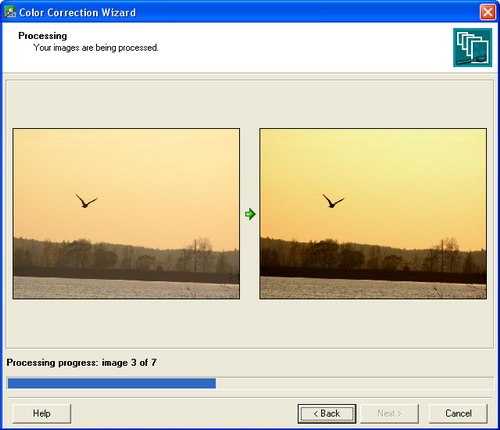
Now completely free! Color Correction Wizard is an indispensable tool in photography, capable of turning even dull images into splashes of color. This program easily fixes a host of common digital imaging problems performing color correction of large collections of images within a couple of minutes. The program effectively solves poor contrast and color balance problems providing a more natural look to your images or helping achieve richer colors on batches of images in automatic or manual mode. Color Correction Wizard has still another useful feature. It can recolor multiple images giving them the same look and feel (color, contrast and brightness). All you need is to select the template image and parameters you want to impose upon other images. This feature can be extremely useful in preparing photos for web galleries. Images can be corrected or enhanced in Color Correction Wizard in one of the following ways: - You can let the program automatically correct image levels, contrast and color balance. - Brightness, contrast and gamma can be adjusted manually. - You can select the template image (an image that is successful or appropriate in terms of color, brightness or contrast), and the program will apply one or several of its parameters to other images, giving them the same look and feel. The program can also resize multiple images according to a template image size. This is a useful feature if you need to quickly prepare a large collection of images with similar characteristics: gamma, brightness, contrast and size. The best thing about it is that you don't have to make a tremendous number of adjustments manually or resize images one by one. You don't even have to be familiar with the terms "levels", "contrast", "color balance" and the like. The program is a useful color correction tool for all digital camera owners, as well as for professional photographers. The program also contains a plugin for creating thumbnails of your photos for web galleries.

Requirements:

Pentium III

Color Correction Wizard 1.1 Bookmark

Hyperlink code:
Hyperlink and Intro code:
Hyperlink for Forum code:

Color Correction Wizard 1.1 Free Download Notice

Top 4 Download periodically updates software information of Color Correction Wizard 1.1 full version from the publisher, but some information may be slightly out-of-date.

Using warez version, crack, warez passwords, patches, serial numbers, registration codes, key generator, pirate key, keymaker or keygen for Color Correction Wizard 1.1 license key is illegal and prevent future development of Color Correction Wizard 1.1. Download links are directly from our mirrors or publisher's website, Color Correction Wizard 1.1 torrent files or shared files from free file sharing and free upload services, including Rapidshare, HellShare, HotFile, FileServe, MegaUpload, YouSendIt, SendSpace, DepositFiles, Letitbit, MailBigFile, DropSend, MediaMax, LeapFile, zUpload, MyOtherDrive, DivShare or MediaFire, are not allowed!

Your computer will be at risk getting infected with spyware, adware, viruses, worms, trojan horses, dialers, etc while you are searching and browsing these illegal sites which distribute a so called keygen, key generator, pirate key, serial number, warez full version or crack for Color Correction Wizard 1.1 download. These infections might corrupt your computer installation or breach your privacy. A keygen or key generator might contain a trojan horse opening a backdoor on your computer. Hackers can use this backdoor to take control of your computer, copy data from your computer or to use your computer to distribute viruses and spam to other people.

Color Correction Wizard 1.1 - Post Your Review

Photo Editor | Polarr 5.11.9.0

**Polarr Photo Editor: A Comprehensive Review** Polarr Photo Editor, developed by Polarr, is a robust and versatile ... performance. **User Interface and Experience** Polarr Photo Editor boasts a sleek and modern interface that is ... One of the standout features of Polarr Photo Editor is its extensive array of editing tools. From ...

Photo editor for Windows 10 XL 26.0.2
Update

... needed to edit, improve, or enhance your photos. Edit photos easily without a long training period. Correct the color, brightness, and contrast values automatically. Create photo montages, photo collages, or ... software FotoWorks XL is the right choice. The photo editor includes all known and good quality photo editing functions such as effect brushes, clone stamp, color correction, auto enhance function, cropping, picture masking, copy ...

VCW VicMan's Photo Editor 8.1

... with all PRO features. With this free easy-to-use image editor, you can turn your snapshots into works of ... and transparency. Other features allow you to select colors with an eyedropper, paint colors in a gradient, and add plain or anti-aliased ...

Yasisoft Image Editor 2.6.0.31

Working with Yasisoft Image Editor is very simple. All tools and effects are ... and perfecting your images. Everything from blurring, sharpening, brightness, contrast, hue, saturation, distortion, noise, and embossing are included. You can also ...

Aoao Photo Editor Platinum 3.6

Aoao Photo Editor Platinum is powerful. It support most picture formats, ... only common picture edit function such as brush, brightness, contrast, saturation, color balance, but also batch rename, convert for image ... Flash sequence and so on. Besides that, Aoao Photo Editor Platinum still support batch with fast speed. Main ... dates, you can add photo dates through Aoao Photo editor. Correct date setting is the Precondition.) Add batch ...