Clipboard History Pro 3.40

Clipboard History Pro 3.40

Clipboard History Pro Full Download Summary

Clipboard History ProClipboard ToolsWin2000, Windows XP, Windows 7 x32, Windows 7 x64, Windows 8, Windows 10, WinServer, WinOther, Windows Vista, Windows Vista x64

User Rating: 1.6 (5 votes)

  • File size: 3.60 MB
  • Platform: Win2000, Windows XP, Windows 7 x32, Windows 7 x64, Windows 8, Windows 10, WinServer, WinOther, Windows Vista, Windows Vista x64
  • License: Free To Try
  • Price: $24.95
  • Downloads: Total: 313 | This Month: 5
  • Released: Aug 3, 2017
  • Publisher: Outertech
  • Publisher URL: https://www.outertech.com

Clipboard History Pro 3.40 Full Description

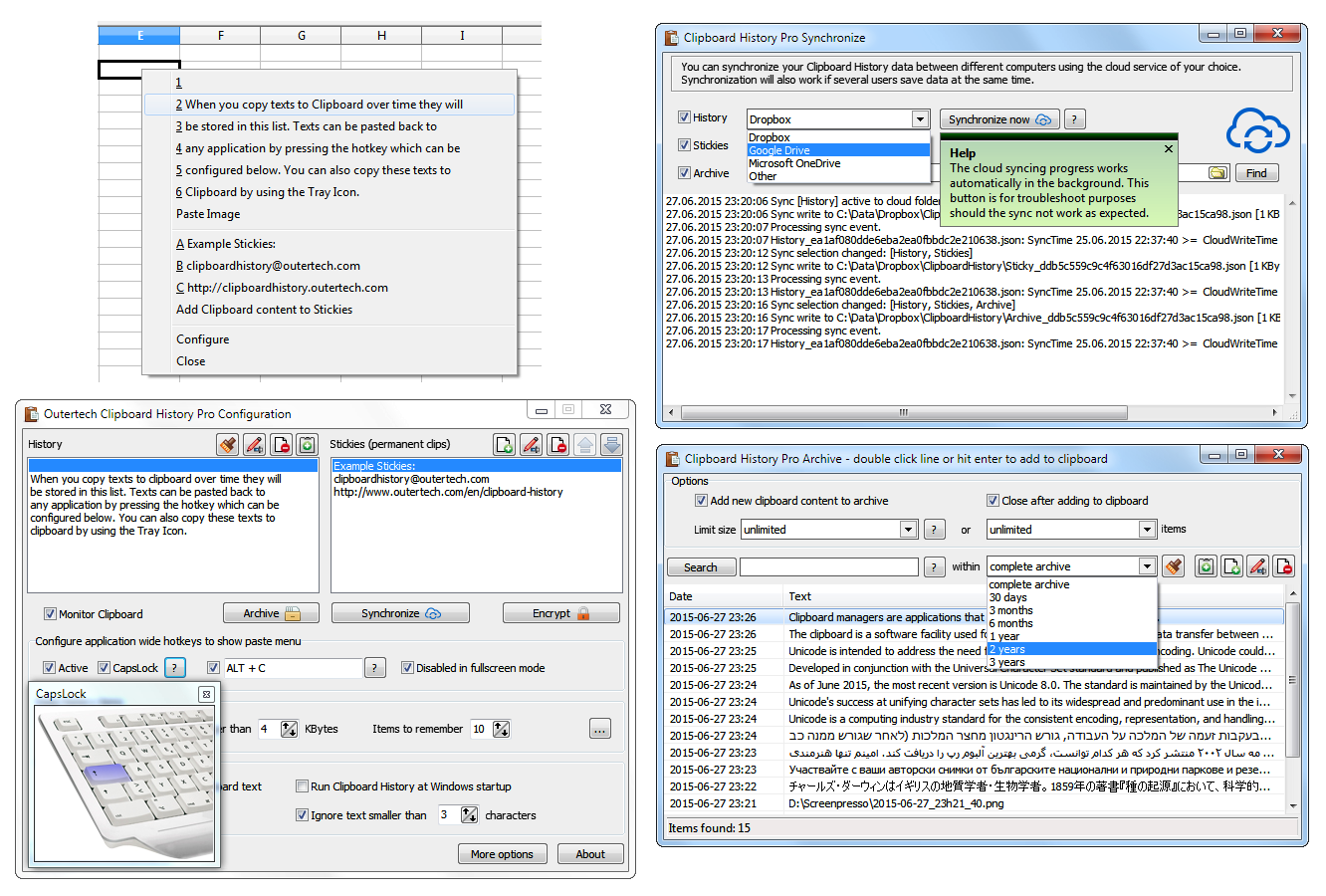
Clipboard History Pro is a Windows clipboard manager featuring optional cloud synchronization and AES encryption. With Clipboard History Pro users can keep a repository of text items that they have copied to the clipboard before. Additionally, frequently used word phrases and snippets called stickies can be added to the global paste menu. Pressing a configurable hotkey, a tray icon, or the usually idle and useless CAPS LOCK key will bring up a paste menu of last clipboard items and saved text snippets. When using the hotkey or the CAPS LOCK key the clipboard history paste menu will be available in every Windows application. With Clipboard History Pro it's easy to set up clipboard content synchronization between multiple computers in less than a minute. The software has built-in support for Dropbox, Google Drive, OneDrive, and others. The synchronization process will also work perfectly in multi-user environments, even if several users add text to the clipboard at the same second. Best of all, Clipboard History Pro safeguards data using AES encryption. At the heart of Clipboard History is a handy archive feature. Every text ever copied to the clipboard can be stored away for future use. A powerful JSON database guarantees a high level of security and performance. Clipboard History has been vested with more than 1 million data records in the text archive. The archive can be searched by text and date. Search keywords can be combined and even excluded with the '-' sign. A search for foo -bar will find all archive items that contain the text foo, but don't contain the text bar.

Requirements:

Windows 10, 8.1, 8, 7, Vista or XP

Release notes:

Major Update
Stickies can be now categorized. For each category a submenu will be created in the global paste menu. History, Stickies and Archive can be now individually encrypted. Auto conversion of HTML to RTF. Formatted text from web browsers can be captured. Delete and blacklist sticky on all PCs function.
[ Clipboard History Pro full changelog ]

Clipboard History Pro 3.40 Bookmark

Hyperlink code:
Hyperlink and Intro code:
Hyperlink for Forum code:

Clipboard History Pro 3.40 Free Download Notice

Top 4 Download periodically updates software information of Clipboard History Pro 3.40 full version from the publisher, but some information may be slightly out-of-date.

Using warez version, crack, warez passwords, patches, serial numbers, registration codes, key generator, pirate key, keymaker or keygen for Clipboard History Pro 3.40 license key is illegal and prevent future development of Clipboard History Pro 3.40. Download links are directly from our mirrors or publisher's website, Clipboard History Pro 3.40 torrent files or shared files from free file sharing and free upload services, including Rapidshare, HellShare, HotFile, FileServe, MegaUpload, YouSendIt, SendSpace, DepositFiles, Letitbit, MailBigFile, DropSend, MediaMax, LeapFile, zUpload, MyOtherDrive, DivShare or MediaFire, are not allowed!

Your computer will be at risk getting infected with spyware, adware, viruses, worms, trojan horses, dialers, etc while you are searching and browsing these illegal sites which distribute a so called keygen, key generator, pirate key, serial number, warez full version or crack for Clipboard History Pro 3.40 download. These infections might corrupt your computer installation or breach your privacy. A keygen or key generator might contain a trojan horse opening a backdoor on your computer. Hackers can use this backdoor to take control of your computer, copy data from your computer or to use your computer to distribute viruses and spam to other people.

Clipboard History Pro 3.40 - Post Your Review

Clipboard Master 5.7.0

Clipboard Master - the smart Clipboard and Text Modules Tool. Keeps all previous texts, pictures and files copied to the clipboard in a list, and inserts them in any ... time. Organize your text modules and snippets and paste them in any Windows program whenever you like. Clipboard Master includes automatic and manual collections. Paste multiple ...

Copy Text Contents 1.5

4dots Copy Text Contents is a small shell extension that ... menu of Windows Explorer and allows you to copy directly the contents of text files to the clipboard. This is useful when you just need to quickly copy to the clipboard the contents,for example, of source code files or other text files, in order to paste them elsewhere. One or multiple files can be ...

Clipboard Magic 5.05

Clipboard Magic is a Windows clipboard enhancement utility. This clipboard extender can dramatically enhance your productivity when cutting ... web forms. Any text copied to the Windows clipboard is automatically archived in Clipboard Magic. This text may be copied back to the clipboard with a click of the mouse. Text may also be edited and added manually. Clipboard lists may be saved to a file to ...

Clipboard Saver 2024-11-07

Clipboard Saver, developed by Stefan Trost, is an innovative utility designed to enhance the functionality of your clipboard. This lightweight yet powerful tool is tailored for ... offering a seamless way to manage and preserve clipboard content. At its core, Clipboard Saver excels in capturing and storing clipboard entries, ensuring that no valuable information is lost. ...

Copy Path to Clipboard 1.2.3.0

... program adds a new command 'Copy Path to Clipboard' into the context menu for files, folders and drives. Pasting the complete filename or foldername is just a mouse click away. You get always the full path. If you hold down CTRL a network path will be converted to UNC path. ...