GiMeSpace KVMShare DesktopFusion 3.0.3

GiMeSpace KVMShare DesktopFusion 3.0.3

GiMeSpace KVMShare DesktopFusion Full Download Summary

GiMeSpace KVMShare DesktopFusionRemote ComputingWin2000, Windows XP, Windows 7 x32, Windows 7 x64, Windows 8, Windows 10, WinServer, WinOther, Windows Vista, Windows Vista x64

User Rating: 0 (0 votes)

  • File size: 2.48 MB
  • Platform: Win2000, Windows XP, Windows 7 x32, Windows 7 x64, Windows 8, Windows 10, WinServer, WinOther, Windows Vista, Windows Vista x64
  • License: Free To Try
  • Price: $25.00
  • Downloads: Total: 66 | This Month: 3
  • Released: Sep 18, 2022
  • Publisher: GiMeSpace
  • Publisher URL: https://www.gimespace.com

GiMeSpace KVMShare DesktopFusion 3.0.3 Full Description

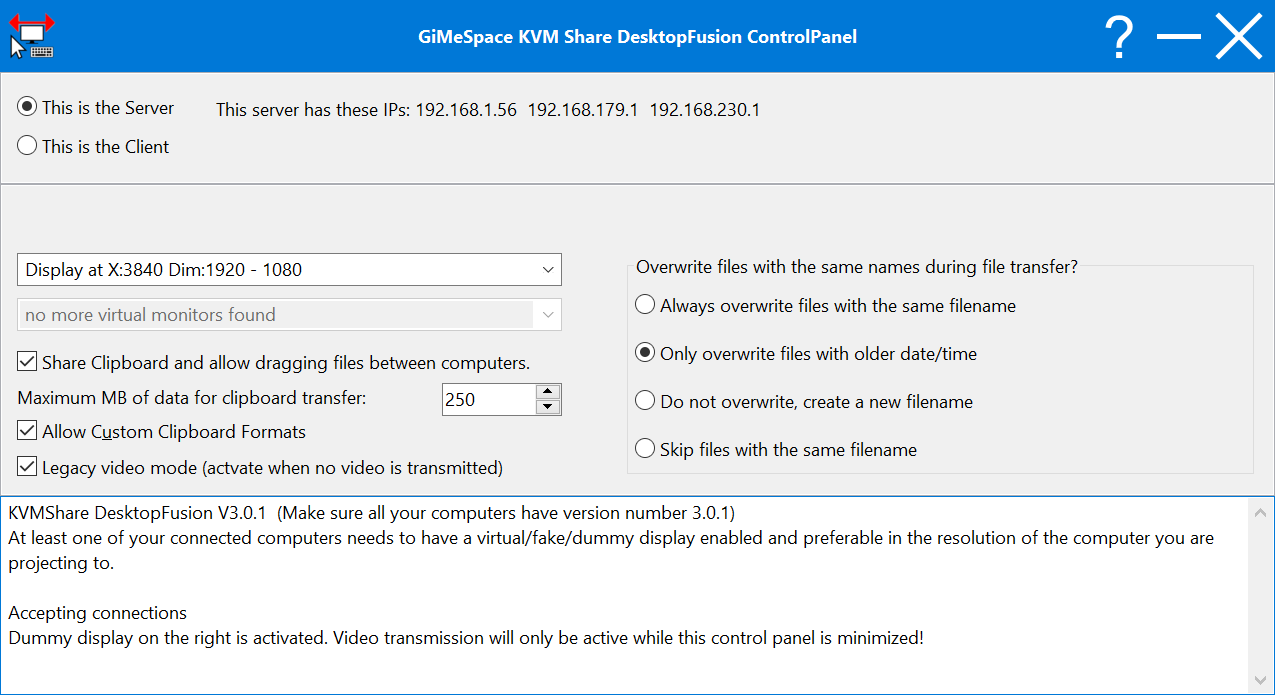
This program is an alternative to KVMShare Pro, it has more or less the same functionality but makes the behaviour of connected computers more like a 2nd or 3th screen thanks to the use of a fake/virtual display driver or a dummy video plug. It merges any windows that are displayed on the dummy display with the display of the connected computer in such a way that you can use programs running on both computers smoothly on one display as if they were all running on the same computer. Compared to the Pro version it really behaves more like a second monitor. You simply move your windows across like you would normally do with a second display. Also menus and scrollbar are working like normal and dialog boxes pop up like usual. The only limitation is that the windows that are displayed on the connected computer are always displayed on top of the programs that are running on that computer. So it is like the windows of that computer are on the background of the second display of the primary computer. You license for KVMShare Pro is also valid for the DesktopFusion edition and the other way around. You simply install the other edition on all your computers and the license stays valid. Recommended is the use of a fake/virtual/dummy video port plug. They can be ordered very cheaply online these days, specially the HDMI and Display Port plugs only cost a couple of dollars including postage. You need to assign a server role to one computer and a client role to the others. The server is typically the computer which is in the middle because only the server can have 2 connections at the same time. Then you need to assign a dummy display screen to each of the connected computers which allows the mouse, keyboard and windows to freely shared with the connected computers. Also sharing clipboard contents and copying files are very easy.

Requirements:

A dummy display plug (can be bought for a couple of dollars online) or a virtual display driver

Release notes:

New Release
Compared to KVMShare Pro, the DesktopFusion edition is using a dummy/virtual display to merge your desktop with the desktop of the connected computer(s) having the advantage of a real second display and controlling the connect computer(s) at the same time.
[ GiMeSpace KVMShare DesktopFusion full changelog ]

GiMeSpace KVMShare DesktopFusion 3.0.3 Keywords

GiMeSpace KVMShare DesktopFusion 3.0.3 Bookmark

Hyperlink code:
Hyperlink and Intro code:
Hyperlink for Forum code:

GiMeSpace KVMShare DesktopFusion 3.0.3 Free Download Notice

Top 4 Download periodically updates software information of GiMeSpace KVMShare DesktopFusion 3.0.3 full version from the publisher, but some information may be slightly out-of-date.

Using warez version, crack, warez passwords, patches, serial numbers, registration codes, key generator, pirate key, keymaker or keygen for GiMeSpace KVMShare DesktopFusion 3.0.3 license key is illegal and prevent future development of GiMeSpace KVMShare DesktopFusion 3.0.3. Download links are directly from our mirrors or publisher's website, GiMeSpace KVMShare DesktopFusion 3.0.3 torrent files or shared files from free file sharing and free upload services, including Rapidshare, HellShare, HotFile, FileServe, MegaUpload, YouSendIt, SendSpace, DepositFiles, Letitbit, MailBigFile, DropSend, MediaMax, LeapFile, zUpload, MyOtherDrive, DivShare or MediaFire, are not allowed!

Your computer will be at risk getting infected with spyware, adware, viruses, worms, trojan horses, dialers, etc while you are searching and browsing these illegal sites which distribute a so called keygen, key generator, pirate key, serial number, warez full version or crack for GiMeSpace KVMShare DesktopFusion 3.0.3 download. These infections might corrupt your computer installation or breach your privacy. A keygen or key generator might contain a trojan horse opening a backdoor on your computer. Hackers can use this backdoor to take control of your computer, copy data from your computer or to use your computer to distribute viruses and spam to other people.

GiMeSpace KVMShare DesktopFusion 3.0.3 - Post Your Review

Remote Desktop Assistant 1.2.605

Remote Desktop Assistant is a wrapper for Microsoft Remote Desktop Connection and OpenSSH. It creates RDP configuration files and utilizes the Remote Desktop Client (mstsc.exe). It allows to configure more RDP file parameters than Remote Desktop Client. Also, the application utilizes the built-in OpenSSH ... addresses of LAN computers. It manages multiple remote desktop connections. You can add, edit and delete remote ...
software award

Remote Mouse 1.11

Turn your iPhone or iPad into a wireless mouse/touchpad and keyboard now! You can take control of your presentations from anywhere in the room. ...

SkyFex Remote Desktop 3.4.0

SkyFex Remote Desktop is a free online remote desktop service that allows watching and controlling remote computers ... Here is a brief list of Skyfex Remote Desktop features (full feature list is available at www.skyfex.com): - Remote computer control via mouse and keyboard; - Support of Firefox, Chrome and Internet Explorer ... connections, - Remote computer system information retrieval, - File transfer, - Laser Pointer and Region Selection tools for ...

Remote Desktop Screenshot 2.2

Remote Desktop Screenshot allows you to capture remote desktop screenshots. You can see all users' desktops at once. With built-in scheduler you can set ... certain computers. KEY FEATURES 1. Capture a remote desktop screenshot. 2. Install an agent-service on remote computers ...

Action1 Connect via Remote Desktop 2.5

If you are looking how to enable Remote Desktop on Windows without previously configuring it properly, this ... help to accomplish it. It will enable remote desktop connections (such as enable and start RDP service, configure necessary firewall rules and more) and allow to use remote access to any workstation by ...