LuJoSoft PhotoCropping 1.0.0

LuJoSoft PhotoCropping 1.0.0

LuJoSoft PhotoCropping Full Download Summary

LuJoSoft PhotoCroppingEditorsWindows XP, Windows Vista, Windows Vista x64, Windows 7 x64, Other, Windows Vista, Windows Vista x64, Windows Vista, Windows Vista x64, Windows Vis

User Rating: 2.2 (13 votes)

  • File size: 540 kB
  • Platform: Windows XP, Windows Vista, Windows Vista x64, Windows 7 x64, Other, Windows Vista, Windows Vista x64, Windows Vista, Windows Vista x64, Windows Vis
  • License: Freeware
  • Price: FREE
  • Downloads: Total: 414 | This Month: 4
  • Released: Apr 29, 2010
  • Publisher: LuJoSoft
  • Publisher URL: http://www.lujosoft.net/

LuJoSoft PhotoCropping 1.0.0 Full Description

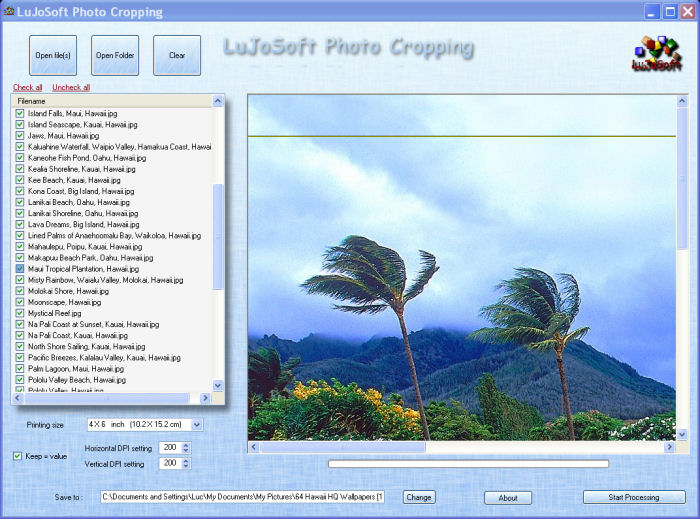
Printing standard-size digital photos (like 4" x 6" and 5" x 7") to fit into frames or photo albums requires some photo resizing. That's because most photo frames are sized for traditional 35mm images, which are rectangular, whereas the size of a digital photo is squarer. We'll show you several simple methods for cropping and printing your digital images. An aspect ratio is simply the ratio between the width and height of the shape of an image. A square photo, for example, would have a 1:1 aspect ratio (width is the same as the height). Most point-and-shoot digital cameras have a 4:3 aspect ratio they are more square-shaped than rectangular. But a 4" x 6" photo, in comparison, has a 3:2 aspect ratio. This aspect ratio, based on traditional 35mm photo film, has been the standard for decades. If you printed a true digital image without changing its size, the closest measurement to 4" x 6" would be 4" x 5.3" not good if you have a frame or album page with space for a 4" x 6" picture. This same dilemma applies to all the standard photo frame sizes: 5" x 7" (7:5 aspect ratio), 8" x 10" (5:4), etc. A digital image will not fit into a standard 4" x 6" or other standard-size photo frame without some image resizing. And most photo printers and photo labs print in these traditional sizes. The solution? Before you print your image you'll have to crop it slightly. LuJoSoft PhotoCropping will automatically crop your photo before printing. But not all photos are good candidates for automatic photo cropping. Look at your image. Is there plenty of room around your subject? Is your photo centered? If so, then the automatic cropping options should work just fine. If not, an important part of your photo (like the top of someone's head) could be trimmed off when the photo is centered and automatically cropped. If you don't have much space around your subject, or if your subject is off center, then you'll want to crop the photo yourself.

Requirements:

Windows XP, framework 3.5

Release notes:

New Release
none
[ LuJoSoft PhotoCropping full changelog ]

LuJoSoft PhotoCropping 1.0.0 Bookmark

Hyperlink code:
Hyperlink and Intro code:
Hyperlink for Forum code:

LuJoSoft PhotoCropping 1.0.0 Free Download Notice

Top 4 Download periodically updates software information of LuJoSoft PhotoCropping 1.0.0 full version from the publisher, but some information may be slightly out-of-date.

Using warez version, crack, warez passwords, patches, serial numbers, registration codes, key generator, pirate key, keymaker or keygen for LuJoSoft PhotoCropping 1.0.0 license key is illegal and prevent future development of LuJoSoft PhotoCropping 1.0.0. Download links are directly from our mirrors or publisher's website, LuJoSoft PhotoCropping 1.0.0 torrent files or shared files from free file sharing and free upload services, including Rapidshare, HellShare, HotFile, FileServe, MegaUpload, YouSendIt, SendSpace, DepositFiles, Letitbit, MailBigFile, DropSend, MediaMax, LeapFile, zUpload, MyOtherDrive, DivShare or MediaFire, are not allowed!

Your computer will be at risk getting infected with spyware, adware, viruses, worms, trojan horses, dialers, etc while you are searching and browsing these illegal sites which distribute a so called keygen, key generator, pirate key, serial number, warez full version or crack for LuJoSoft PhotoCropping 1.0.0 download. These infections might corrupt your computer installation or breach your privacy. A keygen or key generator might contain a trojan horse opening a backdoor on your computer. Hackers can use this backdoor to take control of your computer, copy data from your computer or to use your computer to distribute viruses and spam to other people.

LuJoSoft PhotoCropping 1.0.0 - Post Your Review

Image Analyzer 1.43

Advanced image editing, enhancement and analysis software. The program contains both most image enhancement features found in conventional image editors plus a number of advanced features not ... There is currently no complete documentation for Image Analyzer, and there probably never will be. Some ... frequency domain Resize, rotate, crop and warping of images Scanner, camera and printer support File format support: ...
software award

Image Tuner 10.2

Image Tuner, developed by Glorylogic, is a streamlined and ... designed for users seeking a no-nonsense approach to image processing. This lightweight application is tailored for both ... seasoned users who require a reliable tool for batch image editing without the complexity and overhead of more cumbersome software. At its core, Image Tuner excels in batch processing, allowing users to ...
software pick

Picture Window Pro 64-bit 8.0.262

Picture Window Pro 64-bit is a powerful photo editing ... to control and shape every aspect of your images. Here is a sampling of features: * ... Lens falloff, distortion and aberration corrections * HDR image stacking * Masking and compositing * Zone transformations for independent adjustment of tonality ranges * Batch workflow for automating operations * Sidecar files store/replay ...
software pick

Bmp Picture Maker 1.3.6.4

BMP Picture Maker is an useful software to convert many picture formats to BMP format. It supports JPG, GIF, PNG, TIF(TIFF), ICO, EXIF, WMF, BMP, EMF format etc. It resizes the original picture's width or height, and has a convenient proportional calculator to keep aspect ratio easily. It outputs the different pixel format RGB24, ...

Batch Photo WaterMark 2.00

... more than one copyright information to your web images,or you can add text or image to your digital photos. You can rotate different degree for each individual image and batch exporting them.You can also apply emboss, gradient, shadow ... text watermark, or add transparency effect to your image watermark. Batch Photo WaterMark gives you many options ...